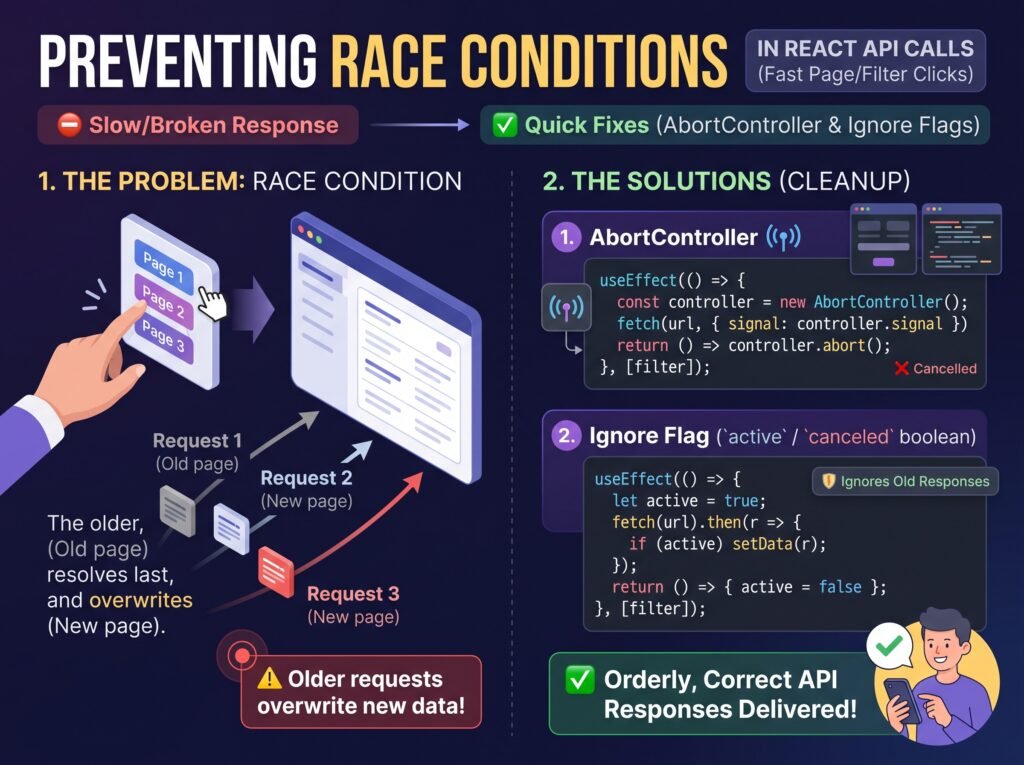
A React application can display the wrong data even when every API request succeeds. This often happens when users type quickly into a search field, switch filters, or navigate between pages before earlier requests finish. The problem is a race condition: asynchronous operations complete in an order that differs from the order in which they were started.
For example, a user searches for “laptop,” then quickly changes the query to “gaming laptop.” React sends two requests. If the second request returns first but the original request finishes afterward, the older results can overwrite the newer ones.
The solution is to ensure that only the response associated with the current request state can update the interface. You can accomplish this with React effect cleanup, an AbortController, a stale-response guard, or a data-fetching library that manages requests and caching.
React’s official guide, You Might Not Need an Effect, specifically discusses this problem in data fetching. This article explains how to prevent stale API responses, handle pagination and filters safely, and choose an appropriate strategy for your application.
What Is a Race Condition in React?
A race condition occurs when the outcome of an operation depends on the timing or order of competing operations. In React applications, asynchronous API requests can finish in any order, regardless of when they were initiated.
Consider a product listing page:
- The user selects the “Electronics” category.
- React sends a request for electronics products.
- The user immediately switches to “Clothing.”
- React sends a second request for clothing products.
- The clothing request finishes first and displays clothing.
- The older electronics request finishes afterward and replaces the clothing results.
The final interface no longer matches the selected filter.
This issue can affect search suggestions, dashboards, user profiles, pagination, sorting, autocomplete, and any interface that fetches data when its inputs change.
A race condition is not necessarily caused by React rendering incorrectly. It is usually a problem in how the application manages asynchronous results.
Why React API Requests Return Out of Order
Network latency, server processing time, response size, caching, and connection conditions can all affect request duration. A request started first is not guaranteed to finish first.
The problem becomes more likely when an application starts a new request every time a user changes a search term, page number, or filter.
For example, this effect fetches data whenever query changes:
useEffect(() => {

  fetch(`/api/products?q=${encodeURIComponent(query)}`)

    .then(response => response.json())

    .then(data => setProducts(data));
}, [query]);
The dependency array correctly synchronizes the effect with the current query. However, there is no protection against an older request finishing after a newer one. Every successful response can update products, even when its query is no longer current.
The fix is not simply to reduce the number of renders or remove the effect dependency. The application needs a strategy for cancelling obsolete work or ignoring obsolete results.
Method 1: Use Effect Cleanup to Ignore Stale Responses
One of the simplest solutions is to give each effect execution its own flag. When React cleans up an effect because its dependencies change or the component unmounts, the flag prevents that request from updating state.
import { useEffect, useState } from 'react';

function ProductSearch({ query }) {
  const [products, setProducts] = useState([]);

  useEffect(() => {
    let ignore = false;
    async function loadProducts() {
      try {
        const response = await fetch(
          `/api/products?q=${encodeURIComponent(query)}`
        );
        if (!response.ok) {
          throw new Error('Failed to fetch products');
        }
        const data = await response.json();
        if (!ignore) {
          setProducts(data);
        }
      } catch (error) {
        if (!ignore) {
          console.error(error);
        }
      }
    }
    loadProducts();
    return () => {
      ignore = true;
    };
  }, [query]);

  return (
    <ul>
      {products.map(product => (
        <li key={product.id}>{product.name}</li>
      ))}
    </ul>
  );
}

export default ProductSearch;
Why This Works
Each execution of the effect has its own ignore variable. When the query changes, React runs the previous effect’s cleanup before starting the replacement effect. The previous request can still finish, but it cannot update the component’s product state.
This approach is useful when the asynchronous operation cannot be cancelled or when you only need to prevent obsolete results from affecting the interface.
However, it does not stop the network request itself. If a request is no longer useful and the underlying API supports cancellation, AbortController can also help.
Method 2: Cancel Previous Fetch Requests With AbortController
The browser’s AbortController API lets you abort supported asynchronous operations, including Fetch requests. Pass its signal to fetch() and call abort() when the effect is cleaned up.
import { useEffect, useState } from 'react';

function ProductSearch({ query }) {
  const [products, setProducts] = useState([]);
  const [error, setError] = useState('');

  useEffect(() => {
    const controller = new AbortController();

    async function loadProducts() {
      try {
        setError('');
        const response = await fetch(
          `/api/products?q=${encodeURIComponent(query)}`,
          { signal: controller.signal }
        );

        if (!response.ok) {
          throw new Error('Failed to fetch products');
        }

        const data = await response.json();
        setProducts(data);
      } catch (error) {
        if (error.name !== 'AbortError') {
          setError(error.message);
        }
      }
    }

    loadProducts();
    return () => controller.abort();
  }, [query]);

  if (error) {
    return <p role="alert">{error}</p>;
  }

  return (
    <ul>
      {products.map(product => (
        <li key={product.id}>{product.name}</li>
      ))}
    </ul>
  );
}

export default ProductSearch;
What Happens When the Query Changes?
When the user changes the query, React cleans up the old effect and aborts its request. The new effect then starts a request for the latest query.
The AbortError check prevents intentional cancellation from being displayed as an ordinary application error.
There is an important distinction: aborting a browser request does not guarantee that the server never received or processed it. Cancellation primarily prevents the client from continuing to wait for or consume a request that is no longer needed. For critical operations, backend safeguards may still be necessary.
Read the MDN AbortController documentation for details about cancellation and browser support.
Let’s Figure It Out.
Tell us what you’re working on and we’ll help you identify the right next step.
Talk to an ExpertMethod 3: Prevent Stale Responses With a Request Identifier
Sometimes a request cannot be cancelled, or the application needs explicit control over which response is allowed to update state. A monotonically increasing request identifier can help.
import { useEffect, useRef, useState } from 'react';

function ProductSearch({ query }) {
  const [products, setProducts] = useState([]);
  const requestId = useRef(0);

  useEffect(() => {
    const currentRequestId = ++requestId.current;

    async function loadProducts() {
      try {
        const response = await fetch(
          `/api/products?q=${encodeURIComponent(query)}`
        );

        if (!response.ok) {
          throw new Error('Failed to fetch products');
        }

        const data = await response.json();

        if (currentRequestId === requestId.current) {
          setProducts(data);
        }
      } catch (error) {
        if (currentRequestId === requestId.current) {
          console.error(error);
        }
      }
    }

    loadProducts();
  }, [query]);

  return (
    <ul>
      {products.map(product => (
        <li key={product.id}>{product.name}</li>
      ))}
    </ul>
  );
}
Each request captures its own identifier. Only the request whose identifier still matches the latest value can update the results.
This is useful when you need a clear latest-request-wins rule. However, this example does not abort old requests or invalidate them immediately on unmount. For a complete lifecycle solution, combine request identity with appropriate cleanup or use the effect-local guard shown earlier.
For ordinary component-level fetching, the cleanup flag or AbortController is often simpler.
Prevent Race Conditions When Users Change Pages or Filters
The same principles apply to pagination and filtering. Your request must represent the complete state that determines the result set.
For example, a paginated product endpoint might depend on:
- Search query
- Selected category
- Page number
- Sort order
- Page size
If any of these values changes, the effect should fetch the correct result set. Every reactive value used by the effect must be represented in its dependencies.
useEffect(() => {

  const controller = new AbortController();

  async function loadPage() {

    const params = new URLSearchParams({

      query,

      category,

      page: String(page),

      sort

    });

    try {

      const response = await fetch(

        `/api/products?${params}`,

        { signal: controller.signal }

      );

      if (!response.ok) {

        throw new Error('Unable to load products');

      }

      const data = await response.json();

      setProducts(data);

    } catch (error) {

      if (error.name !== 'AbortError') {

        setError(error.message);

      }

    }

  }

  loadPage();

  return () => controller.abort();

}, [query, category, page, sort]);
This pattern ensures that a request is associated with the values that triggered it and that obsolete fetches are aborted during cleanup.
If a category change should reset pagination to page one, implement that behavior explicitly when the category changes. Otherwise, a user might request a page number that does not exist in the new category.
Also consider what happens to old results while new data loads. You can clear them, display a loading state, or retain them with a visible indication that an update is in progress. The right choice depends on the interface, but the displayed data should not mislead users about which filters it represents.
Reduce Unnecessary Requests With Debouncing
Preventing stale responses does not necessarily reduce how many requests the application starts. If a search field sends a request for every keystroke, the browser may still initiate many requests even when only the latest result matters.
Debouncing waits until the user has stopped typing for a specified period before starting the request. It reduces unnecessary requests while preserving the ability to fetch results for the latest query.
import { useEffect, useState } from 'react';

function SearchBox() {

  const [input, setInput] = useState('');

  const [query, setQuery] = useState('');

  useEffect(() => {

    const timer = setTimeout(() => {

      setQuery(input.trim());

    }, 300);

    return () => clearTimeout(timer);

  }, [input]);

  return (

     setInput(event.target.value)}

      placeholder="Search products..."

    />

  );

}
This example delays updating query until the input has remained unchanged for 300 milliseconds. You can then use query in a separate fetching effect with cancellation or stale-response protection.
The delay is a design choice, not a universal requirement. Test it against your application’s response times and user experience. Debouncing also does not replace race-condition protection: a previous request may still finish after a newer query has been submitted.
When Should You Use a Data-Fetching Library?
For applications with multiple pages, shared data, caching requirements, and frequent filter changes, manually managing every request can become difficult.
Libraries such as TanStack Query, SWR, and React Router’s data APIs provide established approaches to request management. Depending on the library and configuration, they can support caching, revalidation, deduplication, loading states, and avoiding updates from obsolete requests.
Choose a library when its features solve a real problem in your application rather than adding one solely to fix a single race condition. React’s official guide, Synchronizing with Effects, also explains why manual data fetching in effects requires careful cleanup and why framework-supported data loading can be preferable.
How to Test for Race Conditions in React
Do not test only with a fast connection, because requests may finish in their expected order by coincidence.
Use this checklist:
- Change a search query several times in quick succession.
- Switch categories while a request is still pending.
- Navigate between pages before the previous page finishes loading.
- Use browser network throttling to vary response timing.
- Confirm that the final results match the latest query, filters, and page number.
- Verify that cancelled requests do not display misleading error messages.
- Test loading, empty-result, and error states.
- Repeat the tests with React Strict Mode enabled in development.
React Strict Mode runs an additional development-only effect setup-and-cleanup cycle when enabled at the root. Correct cleanup makes your data-fetching logic resilient to that behavior. For more context, see [INTERNAL LINK: Why Does My React Component Render Twice? Understanding Strict Mode and Fixing Side Effects].
Conclusion
React API race conditions occur when asynchronous requests finish out of order and older responses overwrite newer data. The most reliable fix is to define which response is still relevant and prevent obsolete requests from updating the interface.
Use effect cleanup to ignore stale responses, AbortController to cancel unnecessary fetches, and request identifiers when you need explicit latest-request-wins logic. Add debouncing for search inputs when reducing request volume matters, and consider a data-fetching library as your application grows.
Finally, test realistic timing scenarios rather than assuming requests will finish in the order they started. That is how you keep search results, pagination, and filtered data consistent with what the user actually selected.
Frequently Asked Questions (FAQs)
1. How do I prevent race conditions in React API calls?
Use an effect cleanup function to ignore responses from obsolete requests, or use AbortController to cancel fetches when dependencies change. Ensure only the response associated with the current query, page, or filter can update the interface. For complex applications, a data-fetching library can manage caching and request lifecycles.
2. Does AbortController completely prevent React API race conditions?
No. AbortController helps cancel supported requests, but it does not guarantee that a server has not already received or processed a request. It is effective for preventing obsolete fetches from continuing unnecessarily. For operations that cannot be cancelled, use a stale-response guard or request identifier to prevent outdated results from updating React state.
3. Why does my React search show old results after I type a new query?
The earlier request may finish after the newer request and overwrite its results. This happens because network requests do not necessarily complete in the order they were started. Use effect cleanup or request cancellation, and consider debouncing the search input to reduce unnecessary requests.
4. How can I prevent race conditions when changing pagination or filters?
Include all values that determine the requested data, such as page number, category, search query, and sort order, in the fetching logic and its dependencies. Cancel or invalidate the previous request when these values change. Also reset pagination when appropriate, such as when a new filter makes the current page invalid.
5. Does React Strict Mode cause API requests to run twice?
When root-level Strict Mode is enabled, React performs an additional development-only effect setup-and-cleanup cycle. This can produce an extra network request. Proper cleanup prevents obsolete results from updating the interface, but it may not prevent the request from reaching the server. Strict Mode’s additional checks do not run in production.
6. Should I use React Query or fetch with useEffect to prevent race conditions?
For a small component with one request, fetch with cleanup or AbortController may be sufficient. For applications that need caching, request deduplication, background revalidation, and shared server state, TanStack Query or SWR may reduce the amount of custom request-management code. Choose based on your application’s requirements, and verify the selected library’s cancellation and query-key behavior.
Let’s Talk About Your Business
Not sure which approach is right for your business? Get a free consultation with our team.
Get Free Consultation